Combined plots
The combined plot module provides two specialized multi-panel visualizations that integrate histograms, scatter plots, and statistical summaries for comprehensive data analysis.
See the API reference for full signatures and parameter documentation.
Overview
The combplot module offers two distinct visualization approaches:
combplot_feature: Creates a vertically stacked grid layout for feature analysis. The number of rows grows with the number of features supplied (2 + n_features rows):
- Top row: DNA content histograms
- Second row: DNA vs EdU scatter plots with cell cycle phases
- One additional row per feature: DNA vs feature scatter plots with optional threshold coloring
Passing a single feature string reproduces the classic three-row layout (histogram → EdU → feature). Passing a list of features stacks one scatter row per feature underneath the EdU row, sharing the DNA-content x-axis.
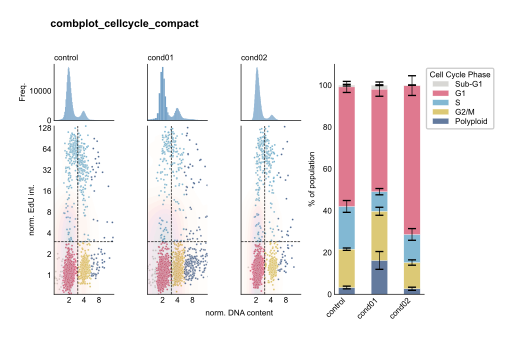
combplot_cellcycle: Creates a 2-row grid with integrated barplot
- Top row: DNA content histograms
- Bottom row: DNA vs EdU scatter plots
- Right column: Stacked cell cycle phase barplot
Examples
Feature Analysis with Threshold
Analyze p21 intensity across conditions with threshold-based coloring:
from omero_screen_plots import combplot_feature
import pandas as pd

df = pd.read_csv("data.csv")
fig, axes = combplot_feature(
    df=df,
    conditions=['control', 'cond01', 'cond02', 'cond03'],
    feature="intensity_mean_p21_nucleus",
    threshold=5000,
    selector_col="cell_line",
    selector_val="MCF10A",
    title="p21 Intensity Analysis",
    cell_number=3000,
    save=True,
    file_format="svg"
)
Cell Area Analysis
Examine cell size distributions with DNA content context:
fig, axes = combplot_feature(
    df=df,
    conditions=['control', 'cond01', 'cond02'],
    feature="area_cell",
    threshold=2000,
    selector_col="cell_line",
    selector_val="MCF10A",
    title="Cell Area Analysis",
    cell_number=2000,
    fig_size=(8, 7)
)
Compact Feature Comparison
Compare control vs treatment with nuclear intensity:
fig, axes = combplot_feature(
    df=df,
    conditions=['control', 'cond01'],
    feature="intensity_mean_nucleus",
    threshold=7500,
    selector_val="MCF10A",
    title="Nuclear Intensity Comparison",
    cell_number=3000,
    fig_size=(6, 7)
)
Stacked Multi-Feature Analysis
Pass a list of features to stack one scatter row per feature beneath the EdU row. The grid height grows automatically, and each feature can take its own threshold (use None to disable colouring for a given row):
fig, axes = combplot_feature(
    df=df,
    conditions=['control', 'cond01', 'cond02', 'cond03'],
    feature=[
        "intensity_mean_p21_nucleus",
        "area_cell",
    ],
    threshold=[5000, None],   # one threshold per feature; None disables it
    selector_col="cell_line",
    selector_val="MCF10A",
    title="Stacked feature analysis",
    cell_number=2000,
    save=True,
    file_format="svg",
)
A scalar threshold (or threshold=None) is broadcast to every feature row, so threshold=None plots all feature rows in a single colour. When fig_size is left as None the figure height scales with the number of rows (matching the classic (10, 7) default for a single feature).

Cell Cycle Distribution Analysis
Comprehensive cell cycle analysis with integrated barplot:
from omero_screen_plots import combplot_cellcycle

fig, axes = combplot_cellcycle(
    df=df,
    conditions=['control', 'cond01', 'cond02', 'cond03'],
    selector_val="MCF10A",
    title="Cell Cycle Distribution",
    cell_number=3000,
    cc_phases=True,
    show_error_bars=True,
    save=True
)
DNA Content Terminology
Use DNA content labels without error bars:
fig, axes = combplot_cellcycle(
    df=df,
    conditions=['control', 'cond01', 'cond02', 'cond03'],
    selector_val="MCF10A",
    title="DNA Content Analysis",
    cc_phases=False,  # Use <2N, 2N, S, 4N, >4N
    show_error_bars=False,
    fig_size=(12, 7)
)
Compact Cell Cycle View
Reduced conditions for space-efficient visualization:
fig, axes = combplot_cellcycle(
    df=df,
    conditions=['control', 'cond01', 'cond02'],
    selector_val="MCF10A",
    title="Compact Cell Cycle",
    cell_number=2000,
    fig_size=(10, 7)
)
Advanced Usage
Data Sampling Control
The cell_number parameter controls sampling for scatter plots only:
# Histograms use full data, scatter plots sample 5000 cells
fig, axes = combplot_feature(
    df=df,
    conditions=conditions,
    feature="intensity_mean_p21_nucleus",
    threshold=5000,
    cell_number=5000,  # Only affects scatter plots
    selector_val="MCF10A"
)
Multiple Feature Comparison
Stack several features in a single figure by passing aligned lists of features and thresholds. Each feature becomes its own scatter row underneath the shared EdU row:
fig, axes = combplot_feature(
    df=df,
    conditions=['control', 'treatment'],
    feature=["intensity_mean_p21_nucleus", "area_nucleus"],
    threshold=[5000, 500],   # aligned with `feature`; lengths must match
    selector_val="MCF10A",
    title="Multi-feature comparison",
)
If you would rather produce one figure per feature (for example to save them as separate files), loop over the features and call combplot_feature with a single feature each time:
features = [
    ("intensity_mean_p21_nucleus", 5000),
    ("area_nucleus", 500),
]

for feature, threshold in features:
    fig, axes = combplot_feature(
        df=df,
        conditions=['control', 'treatment'],
        feature=feature,
        threshold=threshold,
        selector_val="MCF10A",
        title=f"{feature} Analysis",
        fig_size=(6, 7),
    )
Custom Error Bar Control
Toggle error bars on cell cycle barplot:
# Without error bars for cleaner visualization
fig, axes = combplot_cellcycle(
    df=df,
    conditions=conditions,
    selector_val="MCF10A",
    show_error_bars=False,
    cc_phases=True
)
See Also
histogram_plot: Individual histogram plotsscatter_plot: Individual scatter plotscellcycle_stacked: Standalone cell cycle barplotsfeature_plot: Feature comparison plots