Classification plots
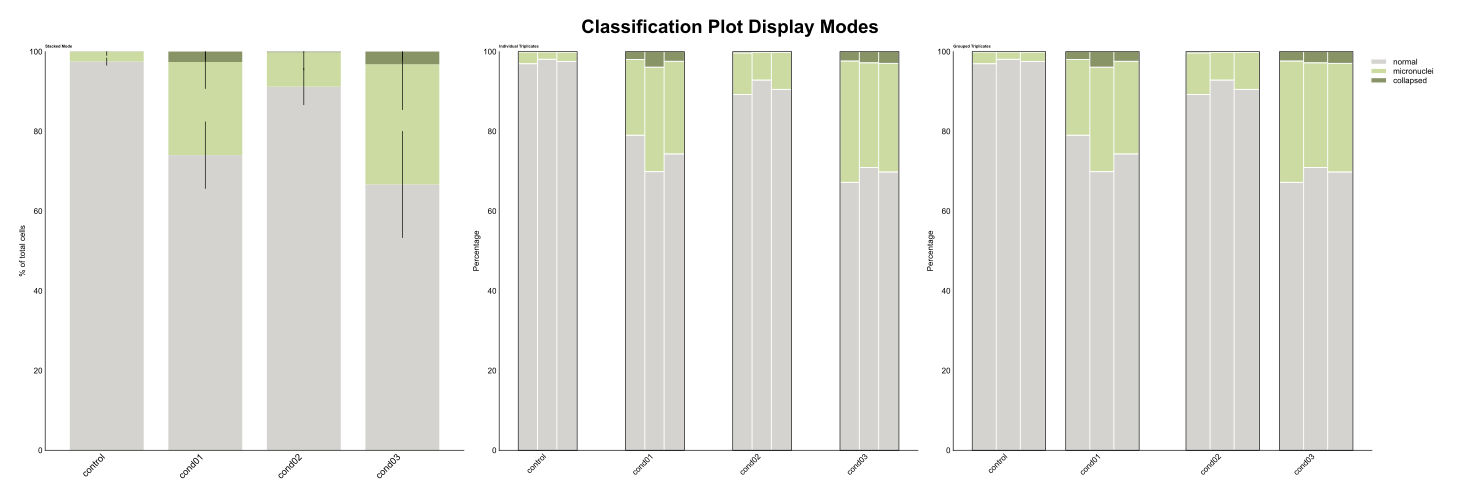
The classification plot visualizes categorical classification results across experimental conditions with flexible display modes for stacked percentages or individual biological replicates.
See the API reference for full signatures and parameter documentation.
Examples
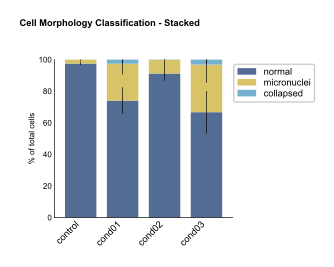
Basic Stacked Classification
Create a standard stacked bar plot showing mean percentages with error bars:
from omero_screen_plots import classification_plot
import pandas as pd

df = pd.read_csv("data.csv")
fig, ax = classification_plot(
    df=df,
    classes=["normal", "micronuclei", "collapsed"],
    conditions=["control", "treatment1", "treatment2"],
    condition_col="condition",
    class_col="classifier",
    selector_col="cell_line",
    selector_val="MCF10A",
    display_mode="stacked",
    title="Cell Morphology Classification",
    save=True,
    file_format="svg"
)
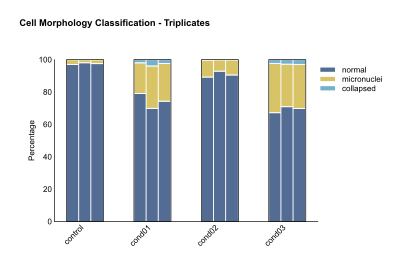
Individual Triplicates Display
Show individual biological replicates to assess experimental consistency:
fig, ax = classification_plot(
    df=df,
    classes=["normal", "micronuclei", "collapsed"],
    conditions=["control", "treatment1", "treatment2"],
    condition_col="condition",
    class_col="classifier",
    selector_col="cell_line",
    selector_val="MCF10A",
    display_mode="triplicates",
    title="Individual Replicates"
)
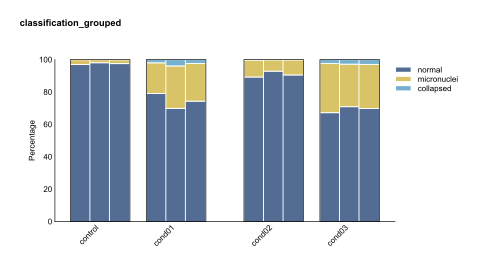
Grouped Conditions
Group related conditions for easier comparison:
fig, ax = classification_plot(
    df=df,
    classes=["normal", "micronuclei", "collapsed"],
    conditions=["control", "treatment1", "treatment2", "treatment3"],
    condition_col="condition",
    class_col="classifier",
    selector_col="cell_line",
    selector_val="MCF10A",
    display_mode="triplicates",
    group_size=2,
    title="Grouped Conditions"
)
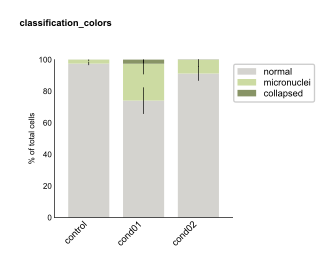
Custom Colors
Apply custom color schemes to match your classification categories:
from omero_screen_plots.colors import COLOR

custom_colors = [COLOR.GREY.value, COLOR.LIGHT_GREEN.value, COLOR.OLIVE.value]

fig, ax = classification_plot(
    df=df,
    classes=["normal", "micronuclei", "collapsed"],
    conditions=["control", "treatment1", "treatment2"],
    condition_col="condition",
    class_col="classifier",
    selector_col="cell_line",
    selector_val="MCF10A",
    display_mode="stacked",
    colors=custom_colors,
    title="Custom Color Scheme"
)
Multi-Panel Comparison
Create publication-ready figures comparing different display modes:
import matplotlib.pyplot as plt

fig, axes = plt.subplots(1, 3, figsize=(15, 5))

# Stacked mode
classification_plot(
    df=df, classes=["normal", "micronuclei", "collapsed"],
    conditions=["control", "treatment1", "treatment2"],
    condition_col="condition", class_col="classifier",
    selector_col="cell_line", selector_val="MCF10A",
    display_mode="stacked", show_legend=False, axes=axes[0]
)
axes[0].set_title("Stacked Mode", fontweight='bold')

# Individual triplicates
classification_plot(
    df=df, classes=["normal", "micronuclei", "collapsed"],
    conditions=["control", "treatment1", "treatment2"],
    condition_col="condition", class_col="classifier",
    selector_col="cell_line", selector_val="MCF10A",
    display_mode="triplicates", group_size=1, axes=axes[1]
)
axes[1].set_title("Individual Triplicates", fontweight='bold')

plt.tight_layout()