How the pipeline works
omero-screen <plate_id> runs plate_loop(), which fetches the plate from OMERO, segments every image, measures every cell and writes the results back to the plate. This page describes each stage and the configuration that controls it. Every command-line option is listed in the CLI reference.
The stages
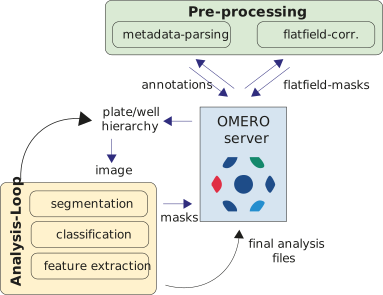
regionprops, and results are written back to OMERO as CSV attachments. Cell-cycle assignment and optional classification run once all wells are done.
- Metadata parsing. The experimental layout (well positions, cell lines, conditions, channel names) is read from an Excel file attached to the plate. It is then converted to OMERO map annotations and the Excel file is removed.
- Flatfield correction. Per-channel illumination masks are built from a random sample of 100 images across the plate. The masks are stored in a dedicated OMERO dataset, so later runs skip this step.
- Well and image loop. For each non-empty well and each image in it:
- the raw pixels are downloaded and divided by the flatfield mask;
- Cellpose segments nuclei (DAPI/Hoechst channel) and cells (cytoplasm channel);
- objects touching the border are removed, and the cytoplasm mask is derived as cell minus nucleus;
skimage.measure.regionprops_tablemeasures the nucleus, cell and cytoplasm regions (see Extracted features);- the well’s results are attached to OMERO as an intermediate CSV, so a crashed run can resume.
- Cell-cycle analysis. If the plate has an EdU channel, integrated DAPI intensity and EdU signal are normalised per cell line and each nucleus is assigned to sub-G1, G1, S, G2/M or polyploid.
- Save results. Plate-level CSVs and QC figures are attached to the plate; the intermediate per-well files are deleted.
Tiled plates and timelapses are better served by stitched mode, which segments the whole well as one canvas.
Re-running a plate
A re-run reuses the segmentation masks already stored in OMERO and only recomputes the measurements. Add --delete to discard the stored masks and segment from scratch, for example after changing a model or a segmentation profile.
Configuration file
Models, features and segmentation profiles come from a JSON configuration. The built-in defaults live in src/data/omero_screen_config.json. To use your own, point OMERO_SCREEN_CONFIG at a JSON file, or pass --config PATH, which takes precedence over the variable. A path that does not exist is an error; the pipeline does not fall back to the defaults.
The file may contain any of three blocks: MODEL_DICT, FEATURELIST and CHANNEL_SEG_PROFILES.
Extracted features
FEATURELIST declares which regionprops properties are measured, split into two groups:
{
  "FEATURELIST": {
    "intensity":  ["intensity_mean", "intensity_max", "intensity_min", "intensity_std"],
    "morphology": ["area", "solidity", "eccentricity", "extent", "perimeter",
                   "area_convex", "axis_major_length", "axis_minor_length",
                   "equivalent_diameter_area"]
  }
}- Intensity features read the pixel data, so they are measured per channel and named
{feature}_{channel}_{segment}. - Morphology features read only the label mask, so they are the same on every channel. They are measured once per segment, on the channel that produced the mask, and named
{feature}_{segment}. labelandcentroidare identity columns and are always added; don’t list them.
Feature names must be valid skimage.measure.regionprops properties. area and intensity_mean are required, because the integrated-intensity column is computed from them, and their presence is checked when the configuration loads. A flat list (the older format) is still accepted and split into the two groups automatically.
The default set is deliberately small. A richer, cell-state-oriented set ships as src/data/omero_screen_config_full.json:
uv run omero-screen <plate_id> --config src/data/omero_screen_config_full.jsonPer-channel segmentation profiles
Cellpose’s default thresholds suit fixed-cell stains such as DAPI and Hoechst, which are bright and even. They miss cells on live-cell markers with variable brightness, such as H2B-RFP, or heterogeneous expression, such as Tubulin-GFP. CHANNEL_SEG_PROFILES applies its own preprocessing and Cellpose parameters when a channel of that name is segmented. The built-in profiles are:
{
  "CHANNEL_SEG_PROFILES": {
    "h2b_rfp": {"gamma": 0.5, "cellprob_threshold": -2.0},
    "tub_gfp": {"gamma": 0.5, "cellprob_threshold": -2.0, "flow_threshold": 0.6}
  }
}
Channel names are matched case-insensitively. Three keys are supported:
| Key | Effect |
|---|---|
gamma |
Dynamic-range compression after percentile rescaling, before Cellpose. Values below 1 lift dim nuclei in frames that also contain bright ones. |
cellprob_threshold |
Passed to Cellpose’s eval(). Lower it (e.g. -2) to accept less confident detections. |
flow_threshold |
Passed to Cellpose’s eval(). Helps cell segmentation when the Tubulin signal is faint at the cell edge. |
Profiles in your configuration file are merged with the built-in ones: an entry replaces the built-in profile of the same name, and the others stay in place. Channels without a profile use the default Cellpose parameters, so fixed-cell plates are unaffected.