How it works
What the pipeline actually does to a plate, how the pieces fit together, and which package owns which step.
What it does
Point it at a plate ID. It reads the experimental layout from the plate’s metadata, corrects illumination, and segments every nucleus and cell with Cellpose. It measures them, assigns each cell a cell-cycle phase from DNA content and EdU signal, and attaches the results back to OMERO. A trained CNN classifies cell features, and Trackastra follows lineages through live-cell timelapses.
omero-screen 1234 --stitch          # segment a plate, write results back to OMERO
cellview import plate 1234          # pull the measurements into a local database
Two commands: analyse the plate, then pull the measurements into a local database you can query, plot and classify.
The journey
Six steps, each with a guide. You do not need to know which Python package owns which step.
| Step | You run | Guide | |
|---|---|---|---|
| 1 | Connect to an OMERO server and check your plate’s metadata | omero-screen --help |
Install & configure |
| 2 | Analyse a plate — segment, measure, assign cell-cycle phase | omero-screen <plate_id> |
Your first plate |
| 3 | Inspect segmentation quality and browse cells interactively | napari widgets | Napari |
| 4 | Store & query single-cell measurements locally | cellview import plate |
CellView |
| 5 | Classify cell features with a trained CNN | cellclass train |
CellClass |
| 6 | Plot publication-ready statistics | Python API | Plots |
Inside one analysis run
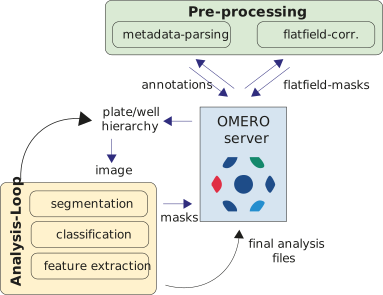
regionprops, and results are written back to OMERO as CSV attachments. Cell-cycle assignment and optional classification run once all wells are done.
Two things are worth knowing early:
- Stitched mode (
--stitch) segments the whole well as one canvas instead of field by field, so a cell straddling two fields is no longer cut in half by the border filter on each side. - Live-cell tracking (
--track) relabels nuclei with a stabletrack_idacross timepoints using Trackastra, giving you lineages rather than independent snapshots.
Why the results are reproducible
Every number in a figure traces back to a plate ID, a segmentation mask stored in OMERO, and a row in a local database. Re-running a plate reproduces it; sharing it means sharing an ID rather than a folder. The analysis stops being something that happened once, on one desktop, in a way nobody can retrace.
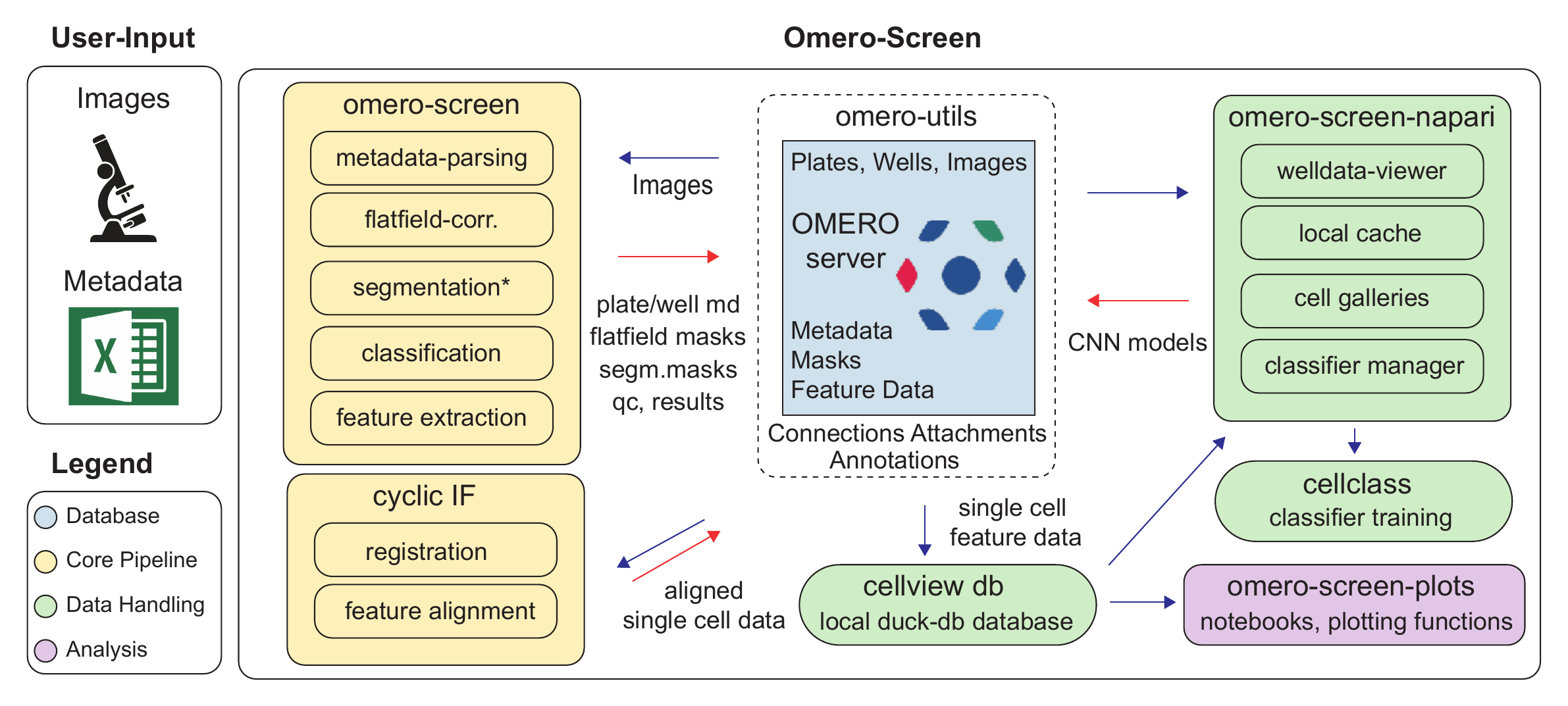
The packages
Each has its own reference site with generated API and CLI documentation.
| Package | What it is |
|---|---|
| omero-screen | The analysis pipeline: Cellpose segmentation, feature extraction, cell-cycle phases, flatfield correction, stitching, tracking |
| cellview | DuckDB-backed single-cell database with a CLI and a Python API |
| omero-screen-plots | Statistical plots built for publication figures — cell cycle, counts, features, classification, synergy |
| omero-screen-napari | Napari widgets for browsing plates, inspecting galleries and labelling CNN training data |
| cellclass | CNN classifier training, sweeps and inference for cell features |
| omero-utils | Connection handling, attachments, map annotations and image I/O against the OMERO API |
Performance and accuracy
The pipeline has been benchmarked across CPU, Apple silicon (MPS) and two NVIDIA GPUs, for both Cellpose 3 and Cellpose 4 models.
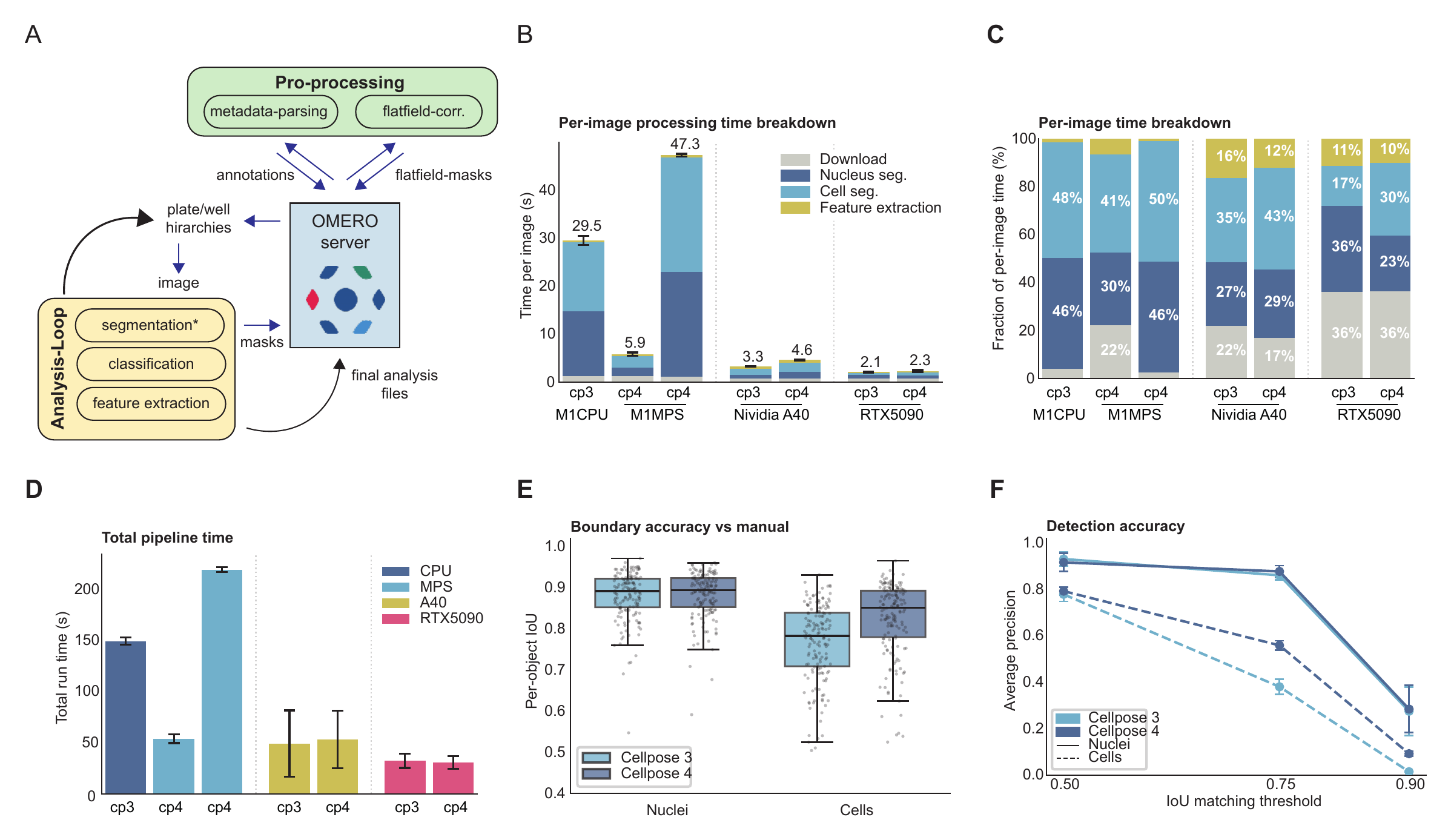
Two practical conclusions: download time dominates on fast GPUs, so the image cache matters more than raw compute once you have one; and Cellpose 4 is markedly more accurate on cell boundaries, which is why it is worth an NVIDIA GPU if you have access to one.