# How it works
What the pipeline actually does to a plate, how the pieces fit together, and which package owns which step.
# What it does
Point it at a plate ID. It reads the experimental layout from the plate's metadata, corrects illumination, and segments every nucleus and cell with [Cellpose](https://www.cellpose.org/). It measures them, assigns each cell a cell-cycle phase from DNA content and EdU signal, and attaches the results back to OMERO. A trained CNN classifies cell features, and [Trackastra](https://github.com/weigertlab/trackastra) follows lineages through live-cell timelapses.
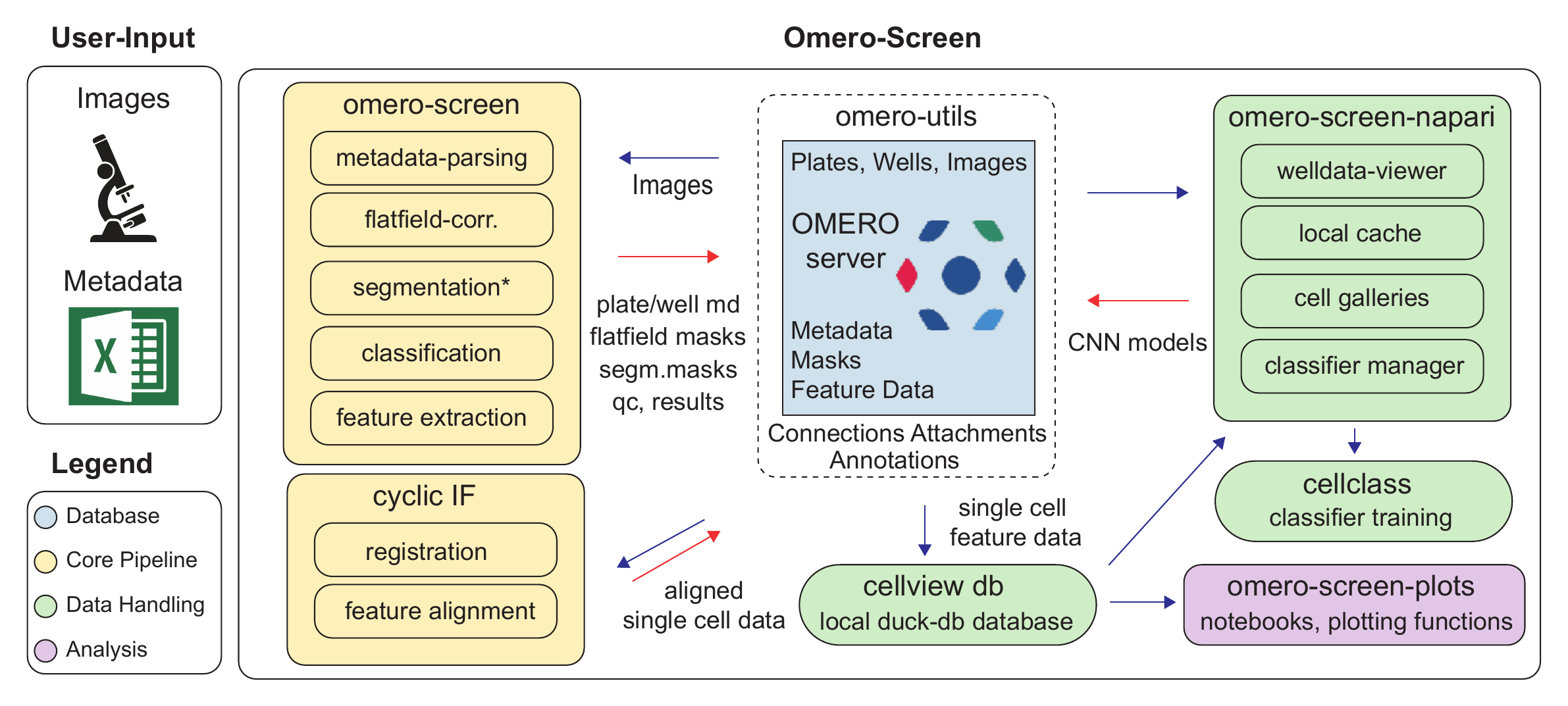
Figure 1: The OMERO-Screen platform. Images and plate metadata enter from the microscope. The core pipeline handles metadata parsing, flatfield correction, segmentation, classification and feature extraction, with a separate cyclic-IF route for registration and feature alignment. omero-utils brokers every exchange with the OMERO server, which stores plates, masks, metadata and feature data. Single-cell measurements land in the local cellview DuckDB database, feeding the napari viewers, cellclass classifier training, and the plotting package.
``` bash
omero-screen 1234 --stitch # segment a plate, write results back to OMERO
cellview import plate 1234 # pull the measurements into a local database
```
Two commands: analyse the plate, then pull the measurements into a local database you can query, plot and classify.
# The journey
Six steps, each with a guide. You do not need to know which Python package owns which step.
| | Step | You run | Guide |
|----|----|----|----|
| 1 | **Connect** to an OMERO server and check your plate's metadata | `omero-screen --help` | [Install & configure](installation.md) |
| 2 | **Analyse** a plate -- segment, measure, assign cell-cycle phase | `omero-screen ` | [Your first plate](first-plate.md) |
| 3 | **Inspect** segmentation quality and browse cells interactively | napari widgets | [Napari](../napari/) |
| 4 | **Store & query** single-cell measurements locally | `cellview import plate` | [CellView](../cellview/) |
| 5 | **Classify** cell features with a trained CNN | `cellclass train` | [CellClass](../cellclass/) |
| 6 | **Plot** publication-ready statistics | Python API | [Plots](../plots/) |
# Inside one analysis run
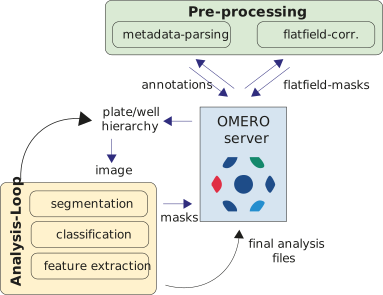
Figure 2: Starting from a plate ID, the pipeline parses experimental metadata, builds per-channel flatfield masks, then iterates over every non-empty well. Each image is segmented with Cellpose, features are extracted with regionprops, and results are written back to OMERO as CSV attachments. Cell-cycle assignment and optional classification run once all wells are done.
Two things are worth knowing early:
- **Stitched mode** (`--stitch`) segments the whole well as one canvas instead of field by field, so a cell straddling two fields is no longer cut in half by the border filter on each side.
- **Live-cell tracking** (`--track`) relabels nuclei with a stable `track_id` across timepoints using [Trackastra](https://github.com/weigertlab/trackastra), giving you lineages rather than independent snapshots.
# Why the results are reproducible
Every number in a figure traces back to a plate ID, a segmentation mask stored in OMERO, and a row in a local database. Re-running a plate reproduces it; sharing it means sharing an ID rather than a folder. The analysis stops being something that happened once, on one desktop, in a way nobody can retrace.
# The packages
Each has its own reference site with generated API and CLI documentation.
| Package | What it is |
|----|----|
| **omero-screen** | The analysis pipeline: Cellpose segmentation, feature extraction, cell-cycle phases, flatfield correction, stitching, tracking |
| **[cellview](../cellview/)** | DuckDB-backed single-cell database with a CLI and a Python API |
| **[omero-screen-plots](../plots/)** | Statistical plots built for publication figures -- cell cycle, counts, features, classification, synergy |
| **[omero-screen-napari](../napari/)** | Napari widgets for browsing plates, inspecting galleries and labelling CNN training data |
| **[cellclass](../cellclass/)** | CNN classifier training, sweeps and inference for cell features |
| **[omero-utils](../utils/)** | Connection handling, attachments, map annotations and image I/O against the OMERO API |
# Performance and accuracy
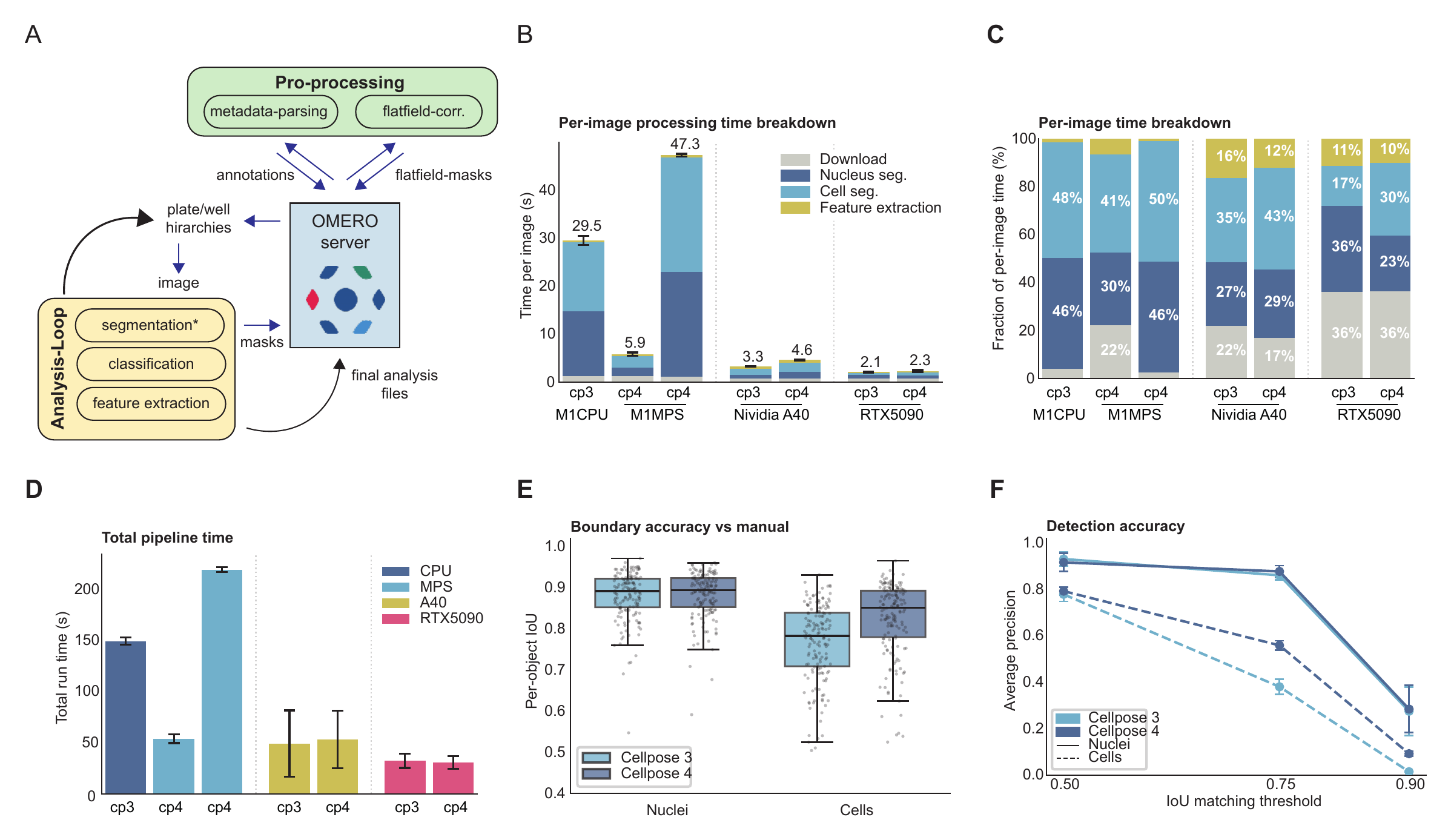
The pipeline has been benchmarked across CPU, Apple silicon (MPS) and two NVIDIA GPUs, for both Cellpose 3 and Cellpose 4 models.
Figure 3: Benchmarking the pipeline. (A) Pre-processing and the analysis loop around the OMERO server. (B, C) Per-image processing time and how it divides between download, nucleus segmentation, cell segmentation and feature extraction. (D) Total pipeline run time across CPU, MPS, an NVIDIA A40 and an RTX 5090. (E) Boundary accuracy against manual annotation, per object, for nuclei and cells. (F) Detection accuracy as average precision across IoU matching thresholds.
Two practical conclusions: download time dominates on fast GPUs, so the image cache matters more than raw compute once you have one; and Cellpose 4 is markedly more accurate on cell boundaries, which is why it is worth an NVIDIA GPU if you have access to one.