# Histogram plots
The histogramplot module provides comprehensive distribution visualization with support for both traditional histograms and kernel density estimation (KDE) overlays. It offers flexible options for single or multiple conditions, logarithmic scaling, and extensive customization.
See the [API reference](../reference/index.md) for full signatures and parameter documentation.
# Examples
## Basic Single Condition Histogram
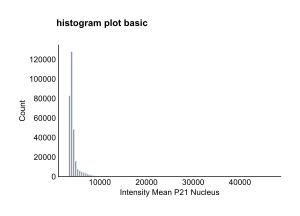
Create a standard histogram for a single condition:
``` python
from omero_screen_plots import histogram_plot
import pandas as pd
df = pd.read_csv("data.csv")
fig, ax = histogram_plot(
df=df,
feature="intensity_mean_p21_nucleus",
conditions="control", # Single condition as string
condition_col="condition",
selector_col="cell_line",
selector_val="MCF10A",
bins=100, # Default value
title="Basic Histogram",
show_title=True,
fig_size=(6, 4),
save=True,
file_format="svg"
)
```
Basic Single Condition Histogram
## Multiple Conditions with Subplots
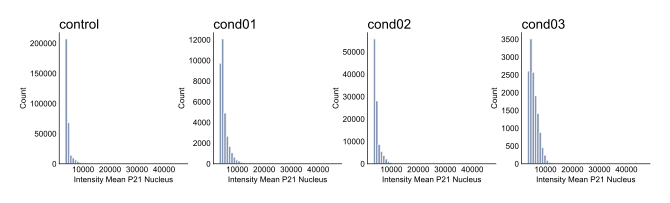
Compare distributions across multiple conditions using automatic subplot layout:
``` python
fig, axes = histogram_plot(
df=df,
feature="intensity_mean_p21_nucleus",
conditions=['control', 'cond01', 'cond02', 'cond03'],
condition_col="condition",
selector_col="cell_line",
selector_val="MCF10A",
bins=50,
title="Multiple Conditions",
show_title=True,
fig_size=(16, 4) # Automatically sized: 4cm per condition
)
```
Multiple Conditions with Subplots
## DNA Content with Log Scale
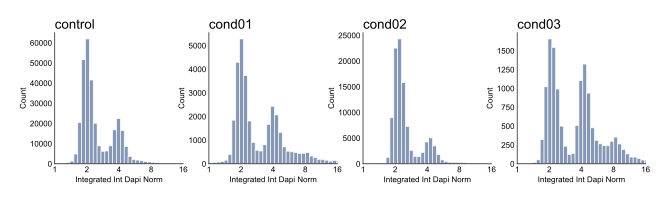
Essential for cell cycle analysis using logarithmic scaling:
``` python
fig, axes = histogram_plot(
df=df,
feature="integrated_int_DAPI_norm",
conditions=['control', 'cond01', 'cond02', 'cond03'],
condition_col="condition",
selector_col="cell_line",
selector_val="MCF10A",
bins=100,
log_scale=True,
log_base=2, # Base 2 for DNA content (2N, 4N)
x_limits=(1, 16), # Typical DNA content range
title="DNA Content Distribution",
show_title=True
)
```
DNA Content with Log Scale
## KDE Overlay Mode
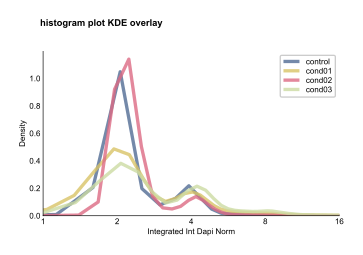
Compare multiple conditions on a single plot using smooth density curves:
``` python
fig, ax = histogram_plot(
df=df,
feature="integrated_int_DAPI_norm",
conditions=['control', 'cond01', 'cond02', 'cond03'],
condition_col="condition",
selector_col="cell_line",
selector_val="MCF10A",
kde_overlay=True, # Enables KDE-only mode
kde_smoothing=0.8, # Smoothing factor
log_scale=True,
log_base=2,
x_limits=(1, 16),
title="KDE Overlay Comparison",
show_title=True,
fig_size=(8, 5)
)
```
KDE Overlay Mode
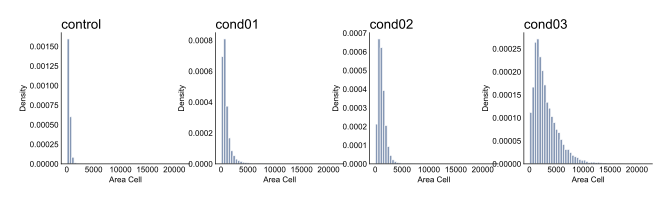
## Normalized Histograms
Show probability density instead of counts for sample-size-independent comparison:
``` python
fig, axes = histogram_plot(
df=df,
feature="area_cell",
conditions=['control', 'cond01', 'cond02', 'cond03'],
condition_col="condition",
selector_col="cell_line",
selector_val="MCF10A",
bins=50,
normalize=True, # Show density instead of counts
title="Cell Area Distribution (Normalized)",
show_title=True
)
```
Normalized Histograms
# Parameters
The histogram_plot function supports extensive customization:
**Plot Modes**: - **Standard histograms**: Multiple conditions create separate subplots - **KDE overlay**: All conditions overlaid on single plot (when `kde_overlay=True`)
**Scaling Options**: - **Linear or logarithmic**: Use `log_scale=True` with customizable `log_base` - **Normalization**: Show density (`normalize=True`) or counts (default)
**Binning Control**: - **Fixed bins**: Integer value (default: 100) - **Automatic strategies**: 'auto', 'sturges', 'fd', etc. - **Unified binning**: Automatic calculation for consistent multi-condition comparison
**KDE Parameters**: - **Smoothing**: Control with `kde_smoothing` (0.5-2.0, default: 0.8) - **Advanced options**: Pass additional parameters via `kde_params` dict - **Resolution**: Higher `gridsize` for smoother curves
**Visual Customization**: - **Colors**: Default blue for histograms, varied palette for KDE overlay - **Figure size**: Dynamic defaults based on condition count - **Titles**: Optional with customizable positioning - **Axis limits**: Custom x-axis range with `x_limits`
## Key Parameters
Essential parameters for different use cases:
**For Cell Cycle Analysis**:
``` python
histogram_plot(df, "integrated_int_DAPI_norm", conditions,
log_scale=True, log_base=2, x_limits=(1, 16))
```
**For Biomarker Comparison**:
``` python
histogram_plot(df, "intensity_mean_p21_nucleus", conditions,
kde_overlay=True, kde_smoothing=0.7)
```
**For Morphological Features**:
``` python
histogram_plot(df, "area_cell", conditions,
normalize=True, bins=50)
```
## Notes on Normalization
When `normalize=True`, the histogram displays **probability density**:
- Y-axis shows density (probability per unit of x-axis)
- Total area under histogram equals 1.0
- Formula: `density = count / (total_count * bin_width)`
- Compatible with KDE overlay (which always shows density)
This allows direct comparison of distributions with different sample sizes, essential for conditions with varying cell counts due to toxicity or proliferation effects.
## Advanced KDE Customization
Fine-tune KDE generation with the `kde_params` dictionary:
``` python
histogram_plot(
df, feature, conditions,
kde_overlay=True,
kde_smoothing=0.6,
kde_params={
'gridsize': 500, # Higher resolution
'bw_method': 'scott', # Bandwidth selection
'cut': 3, # Extend beyond data range
'alpha': 0.9, # Transparency
'linewidth': 3 # Line thickness
}
)
```
**Bandwidth Methods**: - `'scott'`: Good general purpose (default) - `'silverman'`: Alternative automatic method - Float value: Manual bandwidth specification
**Smoothing Guidelines**: - Lower values (0.5-0.7): Smoother, less detailed curves - Default (0.8): Balanced smoothness and detail - Higher values (1.5-2.0): More detailed, potentially noisier