# Count plots
The count plot module provides visualization for cell count analysis across experimental conditions. Count plots support both normalized and absolute count display, statistical significance testing, and flexible grouping layouts for comparative analysis.
See the [API reference](../reference/index.md) for full signatures and parameter documentation.
# Examples
## Basic Normalized Count Plot
Create a standard normalized count plot showing relative counts compared to control:
``` python
from omero_screen_plots import count_plot
import pandas as pd
df = pd.read_csv("data.csv")
fig, ax = count_plot(
df=df,
norm_control="control",
conditions=["control", "cond01", "cond02", "cond03"],
condition_col="condition",
selector_col="cell_line",
selector_val="MCF10A",
title="count plot basic",
fig_size=(6, 4),
save=True,
file_format="svg"
)
```
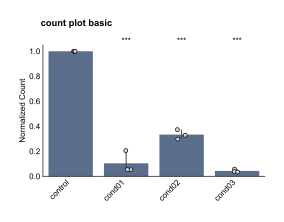
Basic Normalized Count Plot
## Absolute Count Plot
Display raw cell counts without normalization to see actual numbers:
``` python
from omero_screen_plots import count_plot, PlotType
fig, ax = count_plot(
df=df,
norm_control="control",
conditions=["control", "cond01", "cond02", "cond03"],
condition_col="condition",
selector_col="cell_line",
selector_val="MCF10A",
plot_type=PlotType.ABSOLUTE,
title="count plot absolute",
fig_size=(6, 4),
save=True,
file_format="svg"
)
```
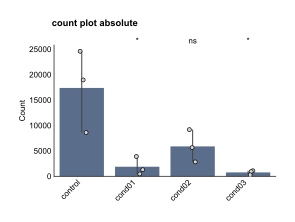
Absolute Count Plot
## Grouped Layout
Group conditions for better visual organization and within-group statistical comparisons:
``` python
fig, ax = count_plot(
df=df,
norm_control="control",
conditions=["control", "cond01", "cond02", "cond03"],
condition_col="condition",
selector_col="cell_line",
selector_val="MCF10A",
group_size=3,
within_group_spacing=0.2,
between_group_gap=0.8,
title="count plot grouped",
fig_size=(6, 4)
)
```
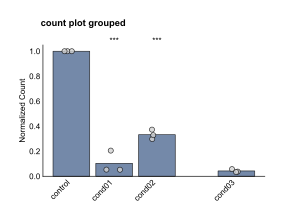
Grouped Layout
## Combined Subplot Analysis
Create multi-panel figures comparing normalized and absolute counts:
``` python
import matplotlib.pyplot as plt
from omero_screen_plots.utils import save_fig
fig, axes = plt.subplots(2, 1, figsize=(2, 4))
fig.suptitle("count plot with axes", fontsize=8, weight="bold")
# Normalized counts
count_plot(
df=df,
norm_control="control",
conditions=["control", "cond01", "cond02", "cond03"],
condition_col="condition",
selector_col="cell_line",
selector_val="MCF10A",
axes=axes[0],
plot_type=PlotType.NORMALISED,
x_label=False
)
axes[0].set_title("MCF10A Norm Counts", fontsize=8, weight="bold")
# Absolute counts
count_plot(
df=df,
norm_control="control",
conditions=["control", "cond01", "cond02", "cond03"],
condition_col="condition",
selector_col="cell_line",
selector_val="MCF10A",
plot_type=PlotType.ABSOLUTE,
axes=axes[1]
)
axes[1].set_title("MCF10A Abs. Counts", fontsize=8, weight="bold")
save_fig(fig, "output/", "count_plot_with_axes", fig_extension="svg")
```
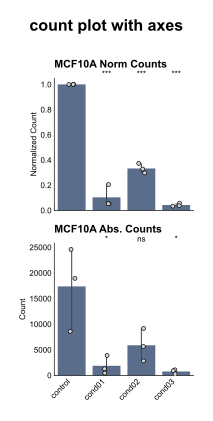
Combined Subplot Analysis