# Combined plots
The combined plot module provides two specialized multi-panel visualizations that integrate histograms, scatter plots, and statistical summaries for comprehensive data analysis.
See the [API reference](../reference/index.md) for full signatures and parameter documentation.
# Overview
The combplot module offers two distinct visualization approaches:
**combplot_feature**: Creates a vertically stacked grid layout for feature analysis. The number of rows grows with the number of features supplied (`2 + n_features` rows):
- Top row: DNA content histograms
- Second row: DNA vs EdU scatter plots with cell cycle phases
- One additional row per feature: DNA vs feature scatter plots with optional threshold coloring
Passing a single `feature` string reproduces the classic three-row layout (histogram → EdU → feature). Passing a list of features stacks one scatter row per feature underneath the EdU row, sharing the DNA-content x-axis.
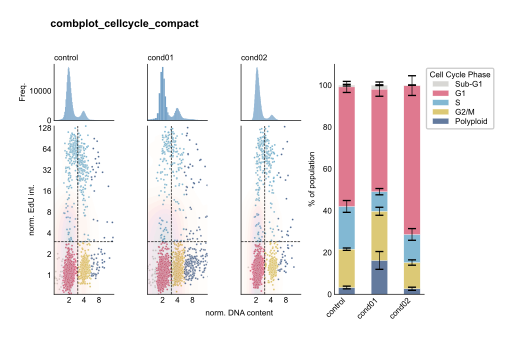
**combplot_cellcycle**: Creates a 2-row grid with integrated barplot
- Top row: DNA content histograms
- Bottom row: DNA vs EdU scatter plots
- Right column: Stacked cell cycle phase barplot
# Examples
## Feature Analysis with Threshold
Analyze p21 intensity across conditions with threshold-based coloring:
``` python
from omero_screen_plots import combplot_feature
import pandas as pd
df = pd.read_csv("data.csv")
fig, axes = combplot_feature(
df=df,
conditions=['control', 'cond01', 'cond02', 'cond03'],
feature="intensity_mean_p21_nucleus",
threshold=5000,
selector_col="cell_line",
selector_val="MCF10A",
title="p21 Intensity Analysis",
cell_number=3000,
save=True,
file_format="svg"
)
```
Feature Analysis with Threshold
## Cell Area Analysis
Examine cell size distributions with DNA content context:
``` python
fig, axes = combplot_feature(
df=df,
conditions=['control', 'cond01', 'cond02'],
feature="area_cell",
threshold=2000,
selector_col="cell_line",
selector_val="MCF10A",
title="Cell Area Analysis",
cell_number=2000,
fig_size=(8, 7)
)
```
Cell Area Analysis
## Compact Feature Comparison
Compare control vs treatment with nuclear intensity:
``` python
fig, axes = combplot_feature(
df=df,
conditions=['control', 'cond01'],
feature="intensity_mean_nucleus",
threshold=7500,
selector_val="MCF10A",
title="Nuclear Intensity Comparison",
cell_number=3000,
fig_size=(6, 7)
)
```
Compact Feature Comparison
## Stacked Multi-Feature Analysis
Pass a **list** of features to stack one scatter row per feature beneath the EdU row. The grid height grows automatically, and each feature can take its own threshold (use `None` to disable colouring for a given row):
``` python
fig, axes = combplot_feature(
df=df,
conditions=['control', 'cond01', 'cond02', 'cond03'],
feature=[
"intensity_mean_p21_nucleus",
"area_cell",
],
threshold=[5000, None], # one threshold per feature; None disables it
selector_col="cell_line",
selector_val="MCF10A",
title="Stacked feature analysis",
cell_number=2000,
save=True,
file_format="svg",
)
```
A scalar `threshold` (or `threshold=None`) is broadcast to every feature row, so `threshold=None` plots all feature rows in a single colour. When `fig_size` is left as `None` the figure height scales with the number of rows (matching the classic `(10, 7)` default for a single feature).
Compact Cell Cycle View
# Advanced Usage
## Data Sampling Control
The `cell_number` parameter controls sampling for scatter plots only:
``` python
# Histograms use full data, scatter plots sample 5000 cells
fig, axes = combplot_feature(
df=df,
conditions=conditions,
feature="intensity_mean_p21_nucleus",
threshold=5000,
cell_number=5000, # Only affects scatter plots
selector_val="MCF10A"
)
```
## Multiple Feature Comparison
Stack several features in a single figure by passing aligned lists of features and thresholds. Each feature becomes its own scatter row underneath the shared EdU row:
``` python
fig, axes = combplot_feature(
df=df,
conditions=['control', 'treatment'],
feature=["intensity_mean_p21_nucleus", "area_nucleus"],
threshold=[5000, 500], # aligned with `feature`; lengths must match
selector_val="MCF10A",
title="Multi-feature comparison",
)
```
If you would rather produce one figure per feature (for example to save them as separate files), loop over the features and call [combplot_feature](../reference/combplot_feature.md#omero_screen_plots.combplot_feature) with a single feature each time:
``` python
features = [
("intensity_mean_p21_nucleus", 5000),
("area_nucleus", 500),
]
for feature, threshold in features:
fig, axes = combplot_feature(
df=df,
conditions=['control', 'treatment'],
feature=feature,
threshold=threshold,
selector_val="MCF10A",
title=f"{feature} Analysis",
fig_size=(6, 7),
)
```
## Custom Error Bar Control
Toggle error bars on cell cycle barplot:
``` python
# Without error bars for cleaner visualization
fig, axes = combplot_cellcycle(
df=df,
conditions=conditions,
selector_val="MCF10A",
show_error_bars=False,
cc_phases=True
)
```
# See Also
- [`histogram_plot`](histogramplot.md) : Individual histogram plots
- [`scatter_plot`](scatterplot.md) : Individual scatter plots
- [`cellcycle_stacked`](cellcyclestacked.md) : Standalone cell cycle barplots
- [`feature_plot`](featureplot.md) : Feature comparison plots