# Cell cycle plots
The cell cycle plot provides comprehensive visualization of cell cycle phase distributions across experimental conditions in a multi-panel grid layout with statistical analysis and flexible phase terminology.
See the [API reference](../reference/index.md) for full signatures and parameter documentation.
# Examples
## Default Cell Cycle Analysis
Create a standard 2x3 grid showing all cell cycle phases with statistical analysis:
``` python
from omero_screen_plots import cellcycle_plot
import pandas as pd
df = pd.read_csv("data.csv")
fig, axes = cellcycle_plot(
df=df,
conditions=['control', 'cond01', 'cond02', 'cond03'],
condition_col="condition",
selector_col="cell_line",
selector_val="MCF10A",
title="Cell Cycle Analysis",
save=True,
file_format="svg"
)
```
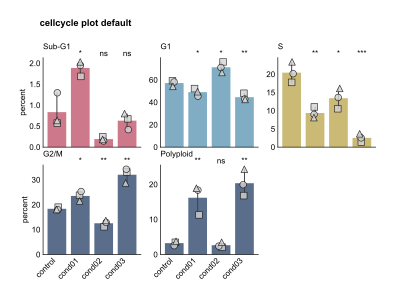
Default Cell Cycle Analysis
## DNA Content Visualization
Focus on DNA content measurements with 2x2 grid layout:
``` python
fig, axes = cellcycle_plot(
df=df,
conditions=['control', 'cond01', 'cond02', 'cond03'],
condition_col="condition",
selector_col="cell_line",
selector_val="MCF10A",
cc_phases=False, # Use DNA content terminology (<2N, 2N, S, 4N, >4N)
title="DNA Content Analysis"
)
```
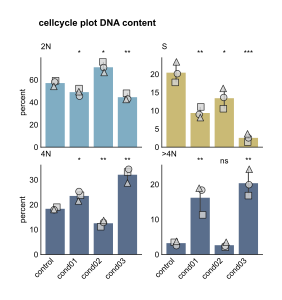
DNA Content Visualization
## Custom Phase Selection
Analyze specific cell cycle phases with custom terminology:
``` python
fig, axes = cellcycle_plot(
df=df,
conditions=['control', 'cond01', 'cond02', 'cond03'],
condition_col="condition",
selector_col="cell_line",
selector_val="MCF10A",
cc_phases=True,
show_subG1=False, # Exclude SubG1
title="Major Cell Cycle Phases"
)
```
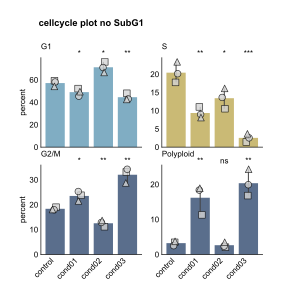
Custom Phase Selection
## Clean Layout with Custom Colors
Create publication-ready figures with custom styling:
``` python
from omero_screen_plots.colors import COLOR
custom_colors = [COLOR.LIGHT_BLUE.value, COLOR.BLUE.value,
COLOR.GREY.value, COLOR.DARK_GREY.value]
fig, axes = cellcycle_plot(
df=df,
conditions=['control', 'cond01', 'cond02', 'cond03'],
condition_col="condition",
selector_col="cell_line",
selector_val="MCF10A",
show_subG1=True,
colors=custom_colors,
show_repeat_points=False,
title="Custom Styled Cell Cycle"
)
```
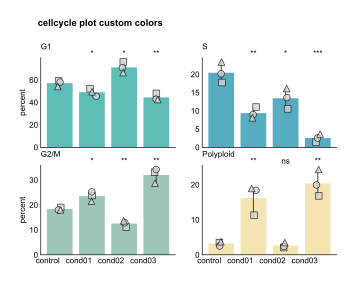
Clean Layout with Custom Colors